Top Sources for an Advertisement Video Template Free Download
Finding high-performing motion assets does not require thousands of dollars in upfront production. The modern creative ecosystem offers extensive libraries where you can access professional, editable layouts for digital and Commercial Video Advertising.
When sourcing free templates, creators and marketing teams generally rely on several top-tier platforms:
Canva: Offers hundreds of editable advertising video templates across multiple visual themes. The browser editor allows complete customization of video clips, typography, and color schemes, exporting high-resolution, watermark-free files on standard free accounts.
Adobe Express: Features a vast catalog of marketing video templates equipped with drag-and-drop tools to trim, crop, split scenes, and apply one-click motion animations.
Jitter: Provides over 50 pre-designed, fully animated ad templates tailored for UI/UX designers and modern marketers looking to create sleek kinetic type and interface reveals.
Figma Community: Hosts a library of open-source, community-built video ad UI kits and motion layouts configured specifically for networks like Google, LinkedIn, and Meta.
Vimeo Create: Provides customizable marketing templates that let you adjust aspect ratios, add brand colors, replace imagery, and sync background audio seamlessly.
Intro HD & Videohive: Offers downloadable project files for advanced video editors, including 4K Ultra HD packages complete with pre-built scene transitions and text placeholders.
Selecting an Advertisement Video Template Free Download for Social Media Campaigns
Short-form video dominates audience attention across mobile feeds. Video ads generate two to three times higher engagement than static image creatives on major social platforms, and over 70% of digital marketing budgets are allocated toward mobile-first video placements.
To capture scrolling users, choose vertical (9:16) and square (1:1) templates engineered for rapid consumption. Platforms like TikTok and Instagram Reels demand tight narrative hooks within the opening three seconds. You can leverage open-source ad frameworks such as the creatify-ai/video-ad-generator repository, which documents proven hook structures (like bold claims and point-of-view setups) paired with feature cascades and clear call-to-action (CTA) patterns.
Whether building user-generated content (UGC) mashups or sleek Product Promotion Videos, selecting a template designed specifically for mobile feeds ensures your captions remain within safe zones and do not overlap with platform UI buttons.
High-Converting Industry Niche Templates for Travel, Fashion, and Tech
Generic templates often require heavy redesigning to fit specific industries. Fortunately, specialized free templates exist across core commercial niches:
Travel and Hospitality: High-resolution templates like the Holiday & Travel Promotion Free Videohive - INTRO HD package provide 4K Ultra HD (3840x2160) modular timelines featuring 20 scenes, 40 image slots, and 48 text placeholders—ideal for airlines, destination resorts, and boutique travel agencies. For stock assets, resources like Las Olas Fort Lauderdale Images offer location-specific backdrops.
Fashion and Apparel: AI-assisted prompt workflows and dynamic video templates, such as the Ultra-Realistic Fashion Sportswear Commercial or the Luxury Jewelry Commercial Amalfi Coast storyboard, deliver cinematic lighting and fabric detail presets for apparel brands.
SaaS and Digital Technology: Web-focused landing page frameworks like the Video Hero Slider Template - Cinematic Landing Page | Swiper Studio combine full-bleed background video sliders with responsive typography. When paired with custom Animation Motion Graphics, these templates convert landing page visitors into software trial users.
Local Businesses and Services: Flexible, quick-turn layouts like the Pointed | Business Video Ad Template deliver 13-second multi-scene promotional frameworks with bold headline typography and dedicated logo slots. You can also explore curated design suites on Free customizable advertising video templates.
How to Edit, Format, and Scale Free Video Ad Templates
Downloading a template is only the first step. To generate measurable revenue, you must adapt the template to reflect your brand identity, messaging hierarchy, and customer journey.

How to Customize Your Advertisement Video Template Free Download Without Editing Skills
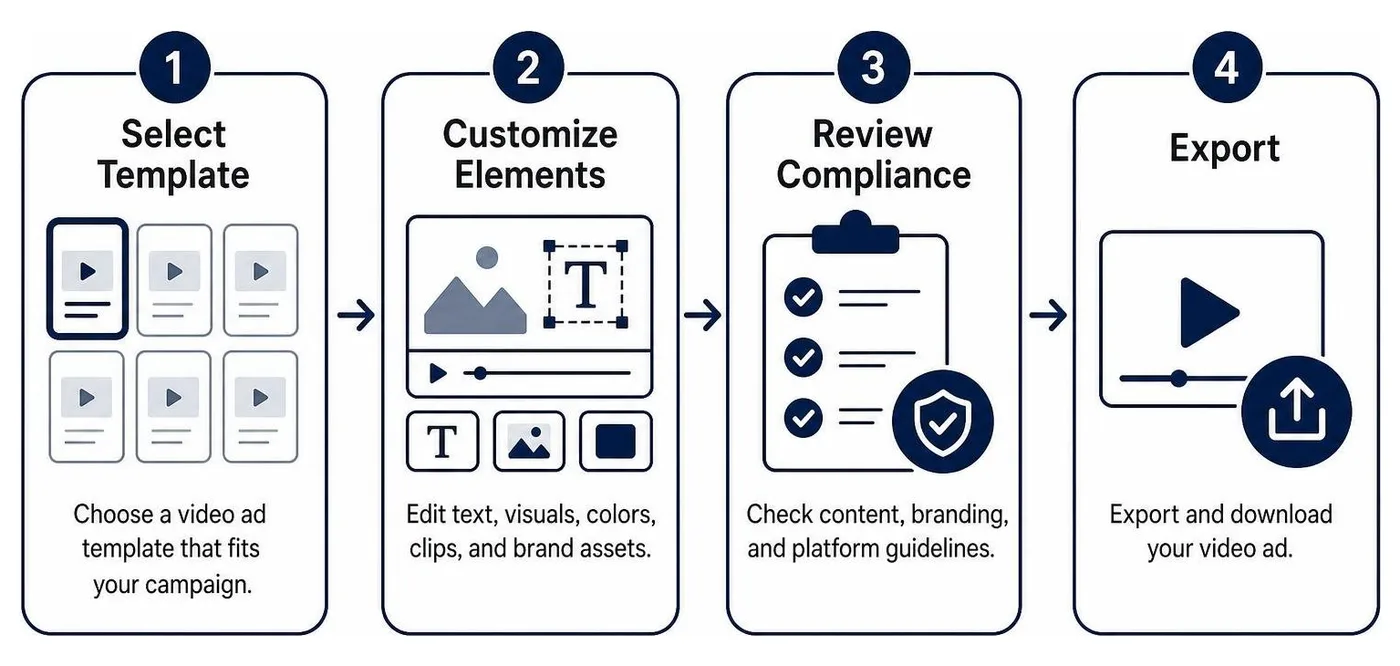
You do not need a degree in post-production to customize modern ad templates. Online web editors provide intuitive interfaces that simplify the production pipeline:
Select and Load: Choose a pre-made layout from a catalog such as Free customizable advertising video templates - Canva and open it in your browser.
Swap Media Assets: Drag your high-resolution product photography, software capture, or live-action video directly into the media drop zones.
Align Visual Branding: Update the default color palette to match your company's hex codes, apply your brand fonts, and position your vector logo in the primary corner overlay.
Refine Typography and Hierarchy: Keep on-screen text concise. Restrict copy to under 20% of the total screen space to maximize readability on mobile displays.
Synchronize Audio: Utilize built-in audio-alignment features or Beat Sync tools to align scene cuts and visual reveals to the tempo of your background track.
If your team lacks the internal bandwidth to customize multiple assets across varying campaigns, leveraging dedicated Video Production Services allows you to scale high-end creative variations while maintaining strategic oversight.
Technical Specifications, Ratios, and Multi-Platform Asset Sizing
Deploying a single video size across every channel leads to awkward cropping, black bars, and lower conversion rates. Match your creative dimensions to platform technical standards:
Aspect Ratio | Standard Resolution | Primary Ad Placements | Key Technical Considerations |
|---|---|---|---|
9:16 (Vertical) | 1080 × 1920 px | TikTok, Instagram Reels, YouTube Shorts, Stories | Keep text and CTAs within vertical safe zones to avoid app overlays. |
16:9 (Landscape) | 1920 × 1080 px (or 4K 3840 × 2160) | YouTube In-Stream, Desktop Landing Pages, CTV | Ideal for narrative storytelling and high-impact hero headers. |
1:1 (Square) | 1080 × 1080 px | Meta Feed (Facebook/Instagram), LinkedIn Feed | Balances screen real estate evenly across mobile and desktop feeds. |
4:5 (Vertical Feed) | 1080 × 1350 px | Instagram Feed, Facebook Mobile Feed | Captures more vertical screen space in mobile feeds than standard square video. |
When preparing commercials for broadcast networks or programmatic streaming, assets must meet stringent delivery standards. Deploying TV Advertising Services requires exact frame rate synchronization (such as 23.976 or 29.97 fps), precise audio normalization (-24 LKFS/LUFS), and broadcast-safe color profiles.
Comparing Free Video Ad Templates, AI Prompt Frameworks, and Paid Assets
Understanding the trade-offs between free downloads, generative AI workflows, and premium assets helps you select the right production path for your marketing roadmap.
Free vs. Paid Template Quality and Commercial Licensing Rights
While free templates offer accessible entry points, they come with operational constraints that businesses must navigate:
Commercial Licensing: Many free project files are restricted to personal use or require visible creator attribution. Ensure all embedded stock clips, audio files, and fonts include full commercial clearances before spending ad budget behind them.
Asset Dependencies: Advanced free templates for Premiere Pro or After Effects often require third-party plugins or external font installations, whereas paid assets typically come pre-packaged with universal expressions and standalone assets.
Watermarks and Export Caps: Certain freemium tools restrict output resolutions to 720p or place watermark logos on exports unless upgraded. Always verify export terms upfront.
For high-stakes campaigns, such as a nationwide TV Product Commercial, enterprise brands often transition from stock templates to custom Commercial Production Services to secure full intellectual property ownership and custom motion assets.
Generative AI Video Ad Workflows vs. Traditional Timeline Editing
The video advertising landscape is expanding beyond static project files. Platforms like PicX Studio (hosting tens of thousands of community AI templates) allow creators to generate hyper-realistic commercial scenes simply by modifying structured text prompts.
AI prompt workflows allow rapid testing of varied lighting setups, environmental moods, and subject angles without coordinating a physical film set. However, traditional timeline editing remains essential for exact typography alignment, brand color accuracy, and multi-scene pacing.
For complex commercial projects, combining AI-assisted visual ideation with structured Studio Production Services delivers the perfect balance of creative velocity and polished, on-brand execution.
Frequently Asked Questions About Video Ad Templates
Can I legally use a free downloadable video ad template for commercial advertising?
Yes, provided the template is explicitly released under a commercial-use license (such as Creative Commons Zero, public commercial licenses, or platform-specific commercial tiers like those in Canva or Adobe Express). Always verify the licenses of any included third-party assets—such as audio tracks, stock video footage, and proprietary fonts—as they may carry separate usage restrictions.
What key elements ensure a downloaded video ad template actually converts?
A high-converting video ad requires:
A 3-Second Hook: Immediate movement or a compelling question to stop the user from scrolling.
Problem-Agitate-Solve (PAS) Structure: Clearly highlighting the viewer's pain point and presenting your product as the solution.
Social Proof: Brief testimonials, ratings, or trust badges to build credibility.
A Distinct CTA: A clear, high-contrast final screen directing the user on the exact next step to take.
For real-world breakdowns of high-performing structures, review this Product Advertisement Video Example.
Which editing software or tools are required to open downloadable ad templates?
It depends on the file format you download:
Browser-Based Templates: Require no software installation and can be edited directly in Canva, Adobe Express, Vimeo, or Figma.
Professional Video Project Files: Files formatted as
.prproj(Adobe Premiere Pro),.aep(Adobe After Effects), or.drp(DaVinci Resolve) require their respective desktop applications. Look for "no plugins required" in the template specifications to ensure smooth editing without purchasing extra software add-ons.
Conclusion
Free downloadable video ad templates eliminate the friction of starting from a blank timeline. By selecting the correct aspect ratio, customizing colors and typography to your brand guidelines, and engineering strong initial hooks, you can produce high-performing motion assets across your marketing channels in record time.
As your business expands across multiple channels, managing disparate templates, design tools, and ad platforms can create operational bottlenecks.
At RewardLion, we eliminate creative fragmentation by providing an all-in-one marketing operating system powered by AI and executed by your dedicated CAPSS team. From omnichannel ad placement and programmatic media buying to end-to-end commercial production and local search domination, we install a fully connected growth engine tailored to your business.
Ready to scale your video marketing with high-converting creative? Explore our breakdown of high-performing Product Promotion Videos and launch your next high-impact campaign today.